前回、PyQt6で作ったお絵描きアプリforTraceからPLY形式で3Dデータを書き出す機能について述べました。今日はこのデータを使い、Blenderのスケルトン(Armature)を作るところまで行ってみます。
ランドマークに新しい頂点を設定する
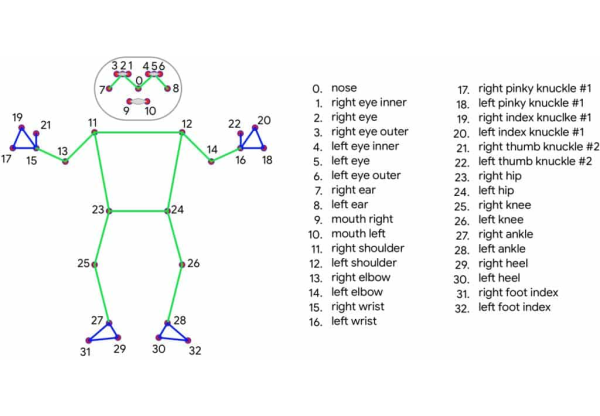
① mediapipeが提供するつながり情報
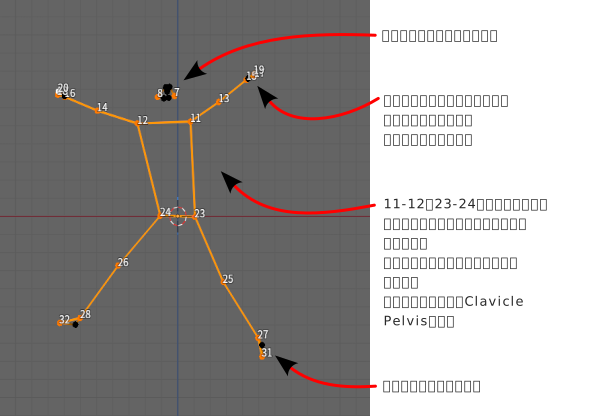
② 修正してスケルトンを作りやすくする
-
7, 8は耳の位置。つないで2等分、11,12を2等分してそれぞれの中点をつないで首と頭のボーンにする。
-
15, 16は手首。中指用の新しい頂点とつないで手のボーンにする。
-
とりあえずこの方針で作ってみる。必要な修正は次回にて。
bpyで auto_skeleton.py を実行
poseMyArtのOBJを利用で作ったbpyスクリプトを流用します。
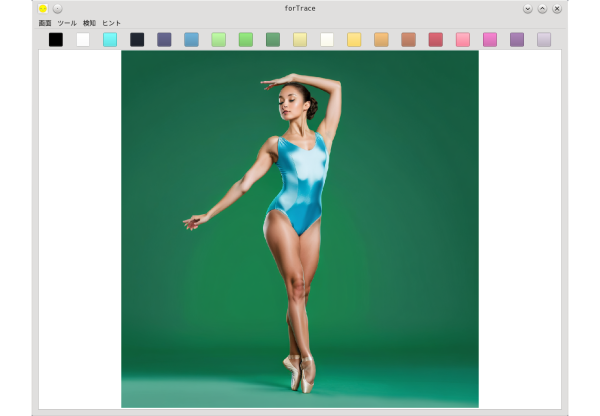
③ CC0で提供されているポーズトロンの写真画像
④ Blender内でauto_skeletonを実行
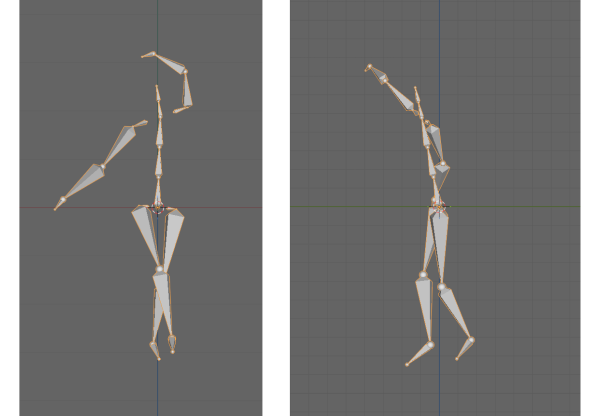
横から見ると、少し傾いて前かがみになっているようです。スキン・メッシュをかぶせてみないとわかりませんが、ヒップを少し回転させてまっすぐ立たせるのがいいかなと思います。
auto_skeleton.py
# forTraceのPLYファイルを読込み、各ボーンになる頂点をつないでスケルトンを作成

import bpy
import bmesh
from mathutils import Vector

# mp_result, Auto_Skeletonがあれば消しておく
deleteUs = ['mp_result', 'Auto_Skeleton']
for ob in deleteUs:
    deleteMe = bpy.data.objects.get(ob)
    if deleteMe:
        bpy.data.objects.remove(deleteMe, do_unlink=True)

# forTraceのPLYをインポート........................................................
fName = "mp_result.ply"
Dir = "/path/to/ply_file/"
fPath = Dir + fName

bpy.ops.wm.ply_import(filepath = fPath,
                      directory= Dir,
                      global_scale=1,
                      use_scene_unit=True,
                      forward_axis='Y',
                      up_axis='Z',
                      merge_verts=True,
                      import_colors='SRGB')

obj = bpy.context.active_object
me = obj.data

# 既存の線分を分割して新しい頂点を作る___________________________________________
# toggleではなくスクリプトでモード指定
bpy.ops.object.mode_set(mode='EDIT')
bm = bmesh.from_edit_mesh(me)
bpy.ops.mesh.select_all(action='DESELECT')

# 耳を結ぶ線を引く
indxList = [8, 7]
# インデックステーブルを更新
bm.verts.ensure_lookup_table()
for i in indxList:
    bm.verts[i].select = True
bpy.ops.mesh.edge_face_add()
bpy.ops.mesh.subdivide()    # インデックス33の頂点ができる
bpy.ops.mesh.select_all(action='DESELECT')

# 人差し指と薬指の線(左右)、肩、腰
bpy.ops.mesh.select_mode(use_extend=False, use_expand=False, type='EDGE')
indxList = [21, 15, 9, 24]
for i in indxList:
    bm.edges.ensure_lookup_table()
    bm.edges[i].select = True
    if i in [21, 15]:
        bpy.ops.mesh.subdivide()    # number_cuts=1
    else:
        # number_cutsは「追加する頂点の数」なので、
        # 4分割したい場合はnumber_cuts=3
        bpy.ops.mesh.subdivide(number_cuts=3)
    bpy.ops.mesh.select_all(action='DESELECT')

# 縦方向に線を引き、分割する
bpy.ops.mesh.select_mode(use_extend=False, use_expand=False, type='VERT')
indxList = [(33, 37), (37, 40)]
indInt = 0
for i in indxList:
    bm.verts.ensure_lookup_table()
    bm.verts[i[0]].select = True
    bm.verts[i[1]].select = True
    bpy.ops.mesh.edge_face_add()
    if indInt == 0:
        bpy.ops.mesh.subdivide()
    else:
        bpy.ops.mesh.subdivide(number_cuts=2)
    indInt += 1
    bpy.ops.mesh.select_all(action='DESELECT')

# メッシュ更新
bmesh.update_edit_mesh(me)
# オブジェクトモードに戻る
bpy.ops.object.mode_set(mode='OBJECT')

# 必要な頂点がそろったので、スケルトン用のつながりリストを作る
bone_defs = {
    "Hip":        [40, "Root"],
    "Stomach":    [44, "Hip"],
    "Chest":      [43, "Stomach"],
    "Neck":       [37, "Chest"],
    "Head":       [42, "Neck"],
    "Head_leaf":  [33, "Head"],
    # 左腕
    "Clavicle_L": [36,  "Chest"],
    "Arm_L":      [11,  "Clavicle_L"],
    "Forearm_L":  [13,  "Arm_L"],
    "Hand_L":     [15,  "Forearm_L"],
    "Hand_L_leaf":[35,  "Hand_L"],
    # 右腕
    "Clavicle_R": [38,  "Chest"],
    "Arm_R":      [12,  "Clavicle_R"],
    "Forearm_R":  [14,  "Arm_R"],
    "Hand_R":     [16,  "Forearm_R"],
    "Hand_R_leaf":[34, "Hand_R"],
    # 左脚
    "Pelvis_L":   [39,  "Hip"],
    "Thigh_L":    [23,  "Pelvis_L"],
    "Calf_L":     [25,  "Thigh_L"],
    "Foot_L":     [27,  "Calf_L"],
    "Foot_L_leaf":[31,  "Foot_L"],
    # 右脚
    "Pelvis_R":   [41,  "Hip"],
    "Thigh_R":    [24,  "Pelvis_R"],
    "Calf_R":     [26,  "Thigh_R"],
    "Foot_R":     [28,  "Calf_R"],
    "Foot_R_leaf":[32,  "Foot_R"],
}


def create_skeleton_from_obj(obj_name):
    obj = bpy.data.objects.get(obj_name)
    if not obj: return

    # 頂点座標の取得(ワールド座標系)
    matrix_world = obj.matrix_world
    vert_coords = {i: matrix_world @ v.co for i, v in enumerate(obj.data.vertices)}

    # アーマチュアの作成
    arm_data = bpy.data.armatures.new("Skeleton_Data")
    arm_obj = bpy.data.objects.new("Auto_Skeleton", arm_data)
    bpy.context.collection.objects.link(arm_obj)

    bpy.context.view_layer.objects.active = arm_obj
    bpy.ops.object.mode_set(mode='EDIT')

    # つなげたくない(根元を離しておきたい)親ボーンのリスト
    no_connect_parents = ["Chest", "Hip"]

    for b_name, (v_idx, p_name) in bone_defs.items():
        bone = arm_data.edit_bones.new(b_name)
        bone.head = vert_coords[v_idx]
        bone.tail = bone.head + Vector((0, 0.05, 0)) # 仮の長さ

        if p_name:
            parent = arm_data.edit_bones.get(p_name)
            if parent:
                bone.parent = parent

                # 親が Chest または Hip の場合はコネクト(use_connect)しない
                if p_name in no_connect_parents:
                    bone.use_connect = False
                    # 親の tail を書き換えない(あるいは親のデフォルトの向きを維持する)
                else:
                    # それ以外のボーンは親とピッタリつなげる
                    parent.tail = bone.head
                    bone.use_connect = True

    # Hip の先端を Stomach のポジションに向ける
    arm_data.edit_bones["Hip"].tail = arm_data.edit_bones["Stomach"].head

    # Chest の先端を Neck のポジションに向ける
    arm_data.edit_bones["Chest"].tail = arm_data.edit_bones["Neck"].head

    bpy.ops.object.mode_set(mode='OBJECT')

    # Delete OBJ
    bpy.data.objects.remove(obj, do_unlink=True)

    # リーフボーン削除 #& 見た目をスティックに変更
    boneObj = bpy.data.objects.get('Auto_Skeleton')
    if boneObj and boneObj.type == 'ARMATURE':
        # オブジェクトを選択してアクティブにする
        bpy.context.view_layer.objects.active = boneObj
        bpy.ops.object.select_all(action='DESELECT')
        boneObj.select_set(True)
        boneObj.show_in_front = True
        #boneObj.data.display_type = 'STICK'

        # 編集モードに切り替え
        bpy.ops.object.mode_set(mode='EDIT')

        # edit_bonesは編集モードに入った後、アクティブオブジェクトのdataから取得
        edit_bones = bpy.context.object.data.edit_bones

        # _leafで終わるボーンをリストアップ
        bones_to_remove = [bone for bone in edit_bones if bone.name.endswith('_leaf')]

        # ボーンを削除
        for bone in bones_to_remove:
            edit_bones.remove(bone)

    # オブジェクトモードに戻る
    bpy.ops.object.mode_set(mode='OBJECT')

#...............................................................................
# インポート後のアクティブなオブジェクト(OBJ)に対して実行
create_skeleton_from_obj(bpy.context.active_object.name)


